Spatial Touch MOD APK v1.2.20 [Premium Unlocked] for Android

Spatial Touch MOD APK
Screenshots
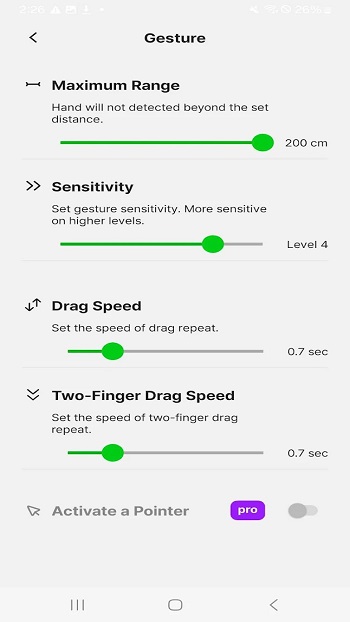
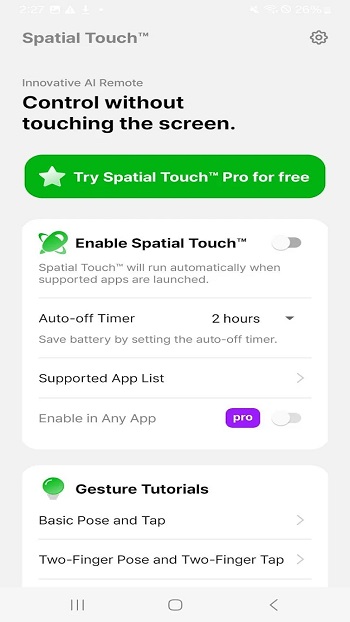
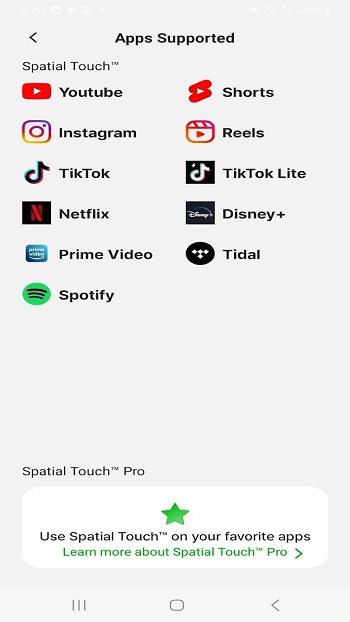
1. Intro
Controlling a smartphone without touching its screen sounds futuristic, but gesture-control technology is making this possible. Spatial Touch is an Android application designed to let users interact with supported apps through simple hand movements.
Whether you are watching YouTube Shorts, browsing Instagram Reels, listening to music, or watching a movie, the application aims to make everyday phone interactions more convenient.
The Spatial Touch MOD APK is an unofficial modified version advertised by third-party websites with premium features unlocked. However, its advertised modifications are not officially verified by the developer. Users should understand the security and compatibility risks before installing modified packages.
This guide covers its actual functionality, features, compatibility, user feedback, and safer alternatives.
2. What Is Spatial Touch?
Spatial Touch is developed by Reehee Company, Inc. It uses the phone’s front-facing camera and on-device AI-based gesture recognition to interpret hand movements.
Instead of repeatedly touching the display, users can perform supported actions using gestures such as pinching, finger movements, and directional movements.
The official application supports popular services, including:
- YouTube and YouTube Music
- Instagram and TikTok
- Netflix and Disney+
- Spotify
- Amazon Prime Video
Its main purpose is to provide a hands-free smartphone experience, particularly when your hands are occupied or the phone is placed at a distance.
Official website: Spatial Touch.
3. Latest Version and APK Details
The following table separates verified official information from details that depend on the individual modified APK file.
| Information | Details |
|---|---|
| App name | Spatial Touch |
| Developer | Reehee Company, Inc. |
| Package name | io.vtouch.spatial_touch |
| Category | Tools |
| Platform | Android |
| Minimum Android | Android 9.0 (official listing) |
| Technology | AI-based hand gesture recognition |
| Camera | Required |
| Accessibility | Optional |
| Monetization | Ads and in-app purchases |
| MOD version | Varies by distributor |
| MOD premium status | Unverified |
Important: Do not assume every website offering Spatial Touch MOD APK provides the same version, file size, or unlocked features. Check the actual APK information before installing it.
Official listing: Spatial Touch on Google Play.
4. Key Features
Hands-Free Gesture Controls
The main attraction is controlling supported applications without physically touching the display. You can use hand gestures to perform actions such as playing or pausing videos and navigating content.
Social Media Control
Spatial Touch is designed to work with social media platforms such as Instagram, TikTok, and YouTube. This can be useful when watching short-form videos from a distance.
Video Playback Management
Users can perform supported playback actions, including:
- Play and pause videos.
- Move to the next or previous video.
- Fast-forward and rewind.
- Adjust playback volume.
- Navigate through supported content.
Actual controls depend on the application and configuration.
Air Pointer
The Air Pointer feature provides a virtual cursor that lets users interact with elements on the screen using hand movements. According to the developer, this is a Pro feature.
Custom Gesture Actions
The Pro edition supports recording actions such as taps, swipes, long presses, and multi-step interactions. Users can assign recorded actions to their preferred gestures.
Always-On Controls
The Always-On feature helps keep gesture controls available across supported applications without repeatedly activating them.
On-Device Gesture Recognition
The developer states that gesture recognition happens directly on the device, rather than sending camera images or videos to external servers.
5. Compatibility and Requirements
Spatial Touch depends on camera quality, lighting conditions, device performance, and Android compatibility.
The developer lists the following recommended requirements:
| Requirement | Recommendation |
|---|---|
| Operating system | Android 9.0 or higher |
| Processor | Snapdragon 7 series or equivalent recommended |
| RAM | 4 GB or more |
| Front camera | 720p minimum |
| Recommended camera | 1080p |
| Internet | May be needed for app services |
| Permissions | Camera and notifications |
Does it work on budget smartphones?
It may work on lower-end devices, but gesture recognition can be less responsive depending on the processor and camera. The developer has also reported improvements to support for lower-end devices.
For better results, use the phone in a well-lit environment and keep your hand clearly visible to the front camera.
6. Personal Experience and Real User Reviews
Spatial Touch offers an interesting alternative to traditional touchscreen controls. Its usefulness depends on how accurately it recognizes gestures and how consistently it works with different applications.
Rather than presenting an unverified personal testing claim, here are examples of feedback published by actual Google Play users.
Positive experience
A Google Play reviewer, Carl Vincent Reboquio, posted feedback on August 6, 2026, describing the application as easy to use. The reviewer also mentioned that the service stopped after approximately two minutes and suggested changing the app’s background battery settings.
Gesture recognition concerns
A reviewer named bahrta sai reported on April 30, 2025, that the application was sensitive to lighting and that it was not always clear where to position the hand. The reviewer also described some gestures as more difficult to perform than others.
Pricing concerns
The same reviewer questioned the price of the full version, mentioning a purchase price of around $40 and the availability of a subscription.
Persistent notification issue
Another Google Play reviewer, Elayna, reported on June 3, 2026, that a persistent notification or shortcut was difficult to dismiss. The developer responded on June 4, 2026, explaining that the shortcut should appear only in supported applications and requesting a screenshot to investigate the issue.
Sources:
My assessment: The concept is useful, especially for media consumption, but gesture accuracy, lighting conditions, battery management, and premium pricing are worth considering before relying on it regularly.
7. Known Issues and Possible Fixes
Like other camera-based applications, Spatial Touch may encounter technical problems on certain devices.
| Problem | Possible solution |
|---|---|
| Gestures not detected | Improve lighting and position your hand clearly |
| App stops running | Check battery optimization settings |
| Controls respond slowly | Close unnecessary background apps |
| Camera not working | Check camera permission |
| Gestures stop in other apps | Review Accessibility permission |
| App crashes | Update the application and restart the phone |
| Persistent notification | Check notification and shortcut settings |
Battery consumption: Continuous camera-based gesture recognition can consume additional power. Disable Always-On controls when they are not needed.
Installation problems: If Android reports an incompatible package, check the Android version, available storage, and APK signature.
8. Security and Privacy
Security is particularly important when installing a modified application that uses camera and Accessibility permissions.
The official developer states that:
- Camera images and videos used for gesture recognition are not stored or transmitted to external servers.
- Gesture recognition is processed directly on the device.
- Camera access is activated when required.
- Accessibility permission is optional and supports interactions with other applications.
However, Google Play’s Data Safety section also declares that the official app may collect and share app activity, app information and performance data, and device or other IDs. Data is encrypted in transit. Apps on Google Play+1
Is Spatial Touch MOD APK safe?
There is no reliable way to guarantee that an unofficial modified APK is safe without examining the exact file.
Potential risks include:
- Modified code containing unwanted tracking components.
- Unexpected camera or Accessibility permission usage.
- Missing security updates.
- Account or personal information exposure.
- Installation of repackaged or malicious APK files.
For better protection:
- Prefer the official Google Play version.
- Avoid disabling Google Play Protect to install a MOD.
- Do not grant unnecessary permissions.
- Check the APK signature and scan downloaded files.
- Avoid entering sensitive account information into modified applications.
A modified version should not automatically be considered safe just because a download website labels it virus-free.
9. Official Version vs MOD APK
| Feature | Official Version | MOD APK |
|---|---|---|
| Developer verification | Yes | Not guaranteed |
| Gesture controls | Yes | Depends on modification |
| Premium features | Paid subscription/purchase | Advertised as unlocked |
| Advertisements | May contain ads | Claimed to be removed |
| Automatic updates | Supported | Usually manual |
| Security updates | Official releases | Uncertain |
| Customer support | Available | Usually unavailable |
| Installation risk | Lower | Higher |
The official version offers a more dependable way to receive updates and developer support. MOD versions may advertise additional benefits, but their functionality and safety cannot be assumed.
10. Official Version and Download
Spatial Touch is available through Google Play and the developer’s official website.
11. Frequently Asked Questions
Q1. What is Spatial Touch MOD APK?
It is an unofficial modified version of Spatial Touch that third-party distributors advertise with unlocked premium features. Its modifications are not verified by the original developer.
Q2. Is Spatial Touch available for Android?
Yes. The official application is available on Google Play for compatible Android devices.
Q3. Does Spatial Touch work without touching the screen?
Yes. It uses front-camera-based hand gesture recognition to perform supported actions without physical screen contact.
Q4. Is Spatial Touch free?
The official app offers free functionality with advertisements and in-app purchases. Some advanced features require Spatial Touch Pro.
Q5. Does Spatial Touch require a camera?
Yes. Camera permission is required because the application uses the front camera to recognize hand movements.
Q6. Is Accessibility permission compulsory?
No. It is optional and is used for controlling other applications and performing screen interactions. WebView Mode also offers a way to use gesture control with YouTube without Accessibility permission.
Q7. Can I use Spatial Touch with Netflix and YouTube?
The developer lists both services among its supported applications. Available controls can vary by application.
Q8. Why are gestures not working properly?
Poor lighting, camera positioning, device performance, and background restrictions can affect gesture recognition.
Q9. Is Spatial Touch MOD APK safe to install?
Its safety cannot be guaranteed without examining the exact modified file. The official version is the safer choice.
Q10. What is the latest Spatial Touch version?
Third-party version listings report version 1.2.19 as of November 7, 2026. However, the official Google Play listing may deliver a different version depending on region and device. Check Google Play for the version available to your phone. filehippo.com+1
12. Final Verdict
Spatial Touch is an interesting Android utility that brings hands-free gesture controls to everyday smartphone use. Its ability to control video playback, scroll through social media, adjust volume, and interact with supported applications makes it useful for people who want a more convenient viewing experience.
However, it is not perfect. Gesture recognition depends on lighting and camera positioning, while background restrictions and premium pricing may affect the overall experience.
The MOD APK may appear attractive because of its advertised premium unlocking and ad-free features, but unofficial modifications introduce security and reliability concerns.
Our recommendation: Try the official Spatial Touch application first. It provides a safer way to explore gesture controls while receiving updates from the original developer. Only consider an unofficial package if you fully understand the risks associated with modified Android applications.
Editorial note: This article uses publicly available developer information and published user feedback. No independent hands-on test of a modified APK is claimed. Version and feature availability may change with future releases.
