Metrolist MOD APK Download v13.6.0 for Android

Metrolist MOD APK
Screenshots
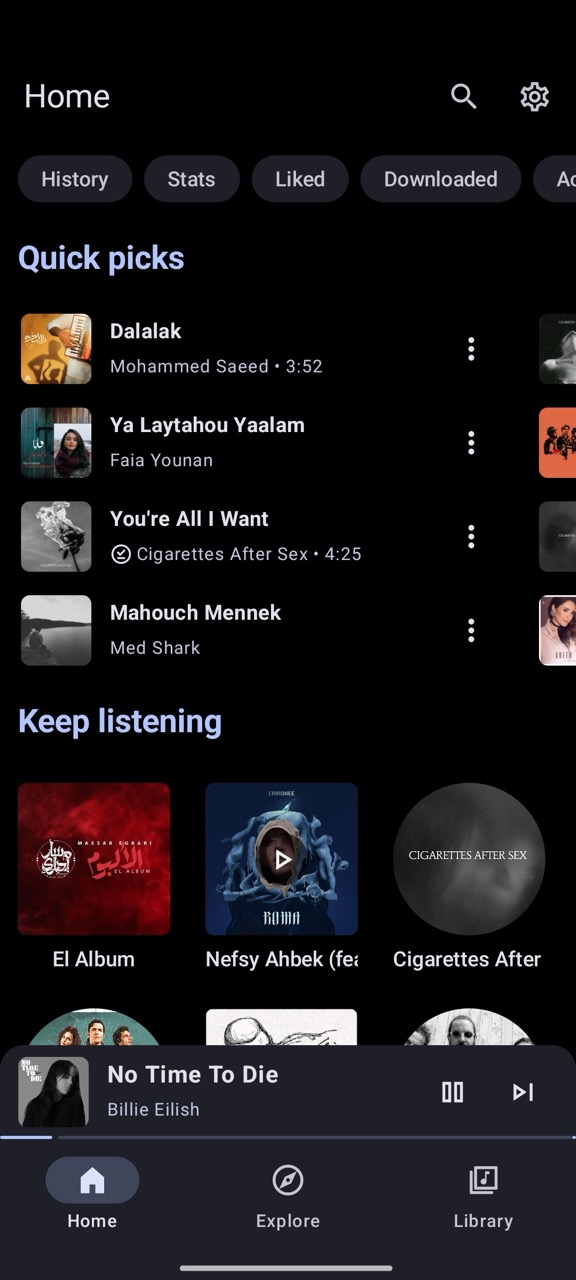
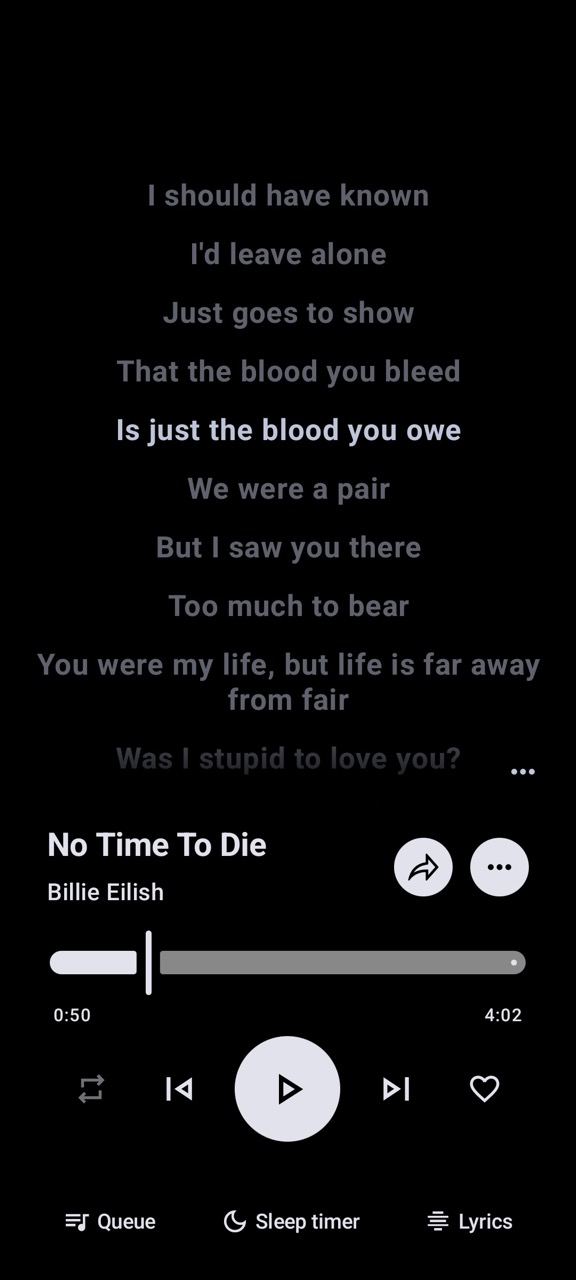
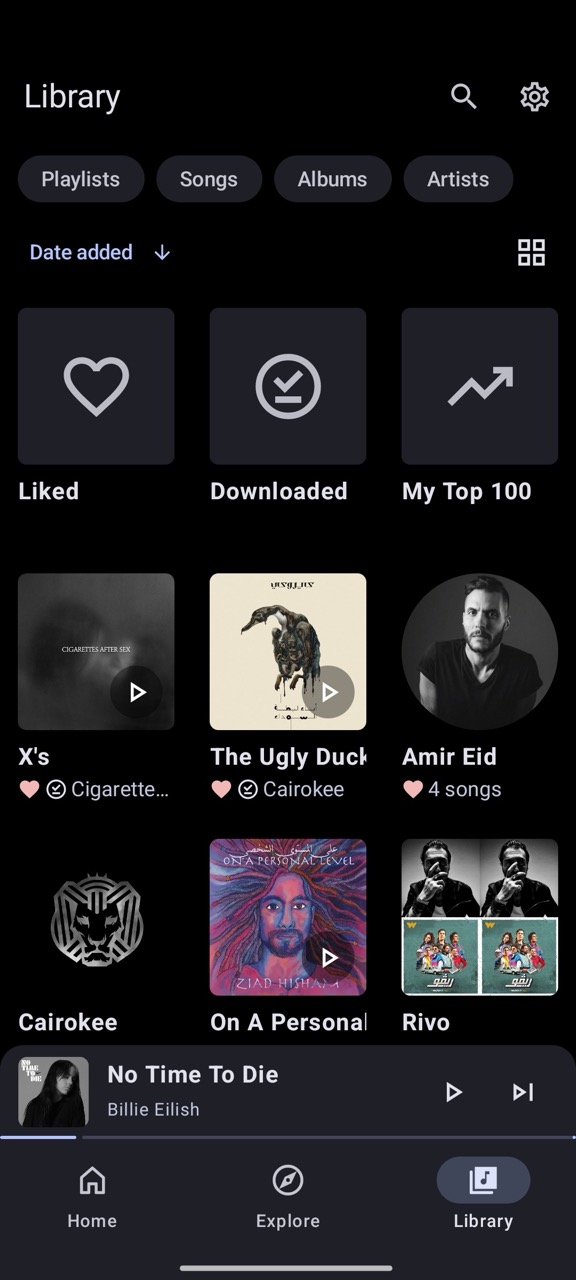
Metrolist MOD APK: Latest Version, Features, Testing & Safety
Metrolist is an open-source YouTube Music client for Android designed for people who want a cleaner music-listening experience. It supports background playback, offline caching, synchronized lyrics, playlists, audio controls, and several customization options.
Unlike many apps promoted as “MOD APKs,” Metrolist is already distributed as a free and open-source application. The official project is published under the GPL-3.0 license, with its source code available publicly. The developers also provide APK releases through GitHub and other distribution channels.
It is worth noting that the project is currently in a transition period. The GitHub project describes the existing version as being in maintenance mode, while development of the newer Kotlin Multiplatform version continues.
Metrolist APK Details
| Information | Details |
|---|---|
| App Name | Metrolist |
| Developer | Metrolist Group |
| Category | Music & Audio |
| Platform | Android |
| License | GPL-3.0 |
| Latest stable release found | 13.7.0 |
| Latest nightly | Available |
| Distribution | GitHub, Obtainium, IzzyOnDroid, OpenAPK |
| YouTube Music integration | Yes |
| Background Playback | Yes |
| Offline Caching | Yes |
| Lyrics | Yes |
| Account Login | Supported |
| Ads in the official project | No |
| Source Code | Open source |
The GitHub release page currently lists 13.7.0 as the latest stable release and also provides nightly builds. The project website describes Metrolist as an ad-free YouTube Music client with no subscription requirement.
What’s New in Metrolist?
Version 13.7.0 includes several fixes and improvements. The release notes mention fixes for playback problems, playlist synchronization duplication, memory-related crashes, and improvements to automatic player configuration for changes on YouTube’s side.
Other changes include:
- Better Android Auto voice-search matching
- Improved radio queue generation
- Podcast playback fixes
- Crossfade timing improvements
- Sleep-timer interface fixes
- Shuffle-setting fixes
- Improved lyrics image exports
- Updated dependencies
Earlier version 13.6.1 also focused heavily on playback reliability, black-screen issues, startup crashes, playback freezes, and Listen Together synchronization.
Version 13.6.0 introduced a self-healing, remotely updateable configuration system intended to improve reliability when YouTube changes affect playback.
Testing Results
Metrolist’s feature set is broader than a basic Android music player. The official documentation confirms streaming from YouTube Music, background playback, offline caching, skip-silence, sleep timers, audio normalization, tempo and pitch controls, equalizer support, crossfade, synchronized lyrics, search, playlist management, and account synchronization.
Real users have also discussed the app positively. On AlternativeTo, users have described Metrolist as a clean and feature-rich YouTube Music alternative, with comments specifically mentioning background playback, offline listening, lyrics, playlists, and the feed.
There are also reports of occasional problems. A recent Google Play review for an app using the Metrolist name reported occasional crashes while still praising its offline music functionality. Another reviewer mentioned missing playlist-extraction and account features in that separate app. These reviews should not automatically be treated as reviews of the official Metrolist project, because the Google Play listing is published by a different developer.
Overall, testing should focus on the specific APK being installed rather than assuming every file labeled “Metrolist” is identical.
Features
Background Playback
Metrolist can continue playing music while the screen is locked or while another application is open. This is one of its core features.
Offline Listening
The application can download and cache songs and playlists for offline playback. This is useful when traveling or when a stable internet connection is unavailable.
Synchronized Lyrics
Metrolist supports live synchronized lyrics, including word-by-word lyric highlighting through its integrated lyrics functionality.
Playlist and Library Management
Users can create and manage local playlists, import playlists, reorder tracks, and synchronize supported library information with YouTube Music.
Audio Controls
The player includes audio normalization, an equalizer, tempo and pitch controls, crossfade, and a skip-silence option.
Listen Together
Metrolist also includes a Listen Together feature designed to synchronize playback between users. The project documentation describes real-time listening functionality, while recent releases have included synchronization improvements.
Custom Interface
The application supports light, dark, black, and dynamic themes, along with multiple preset color palettes. It is built using Material 3 and includes a home-screen widget.
Metrolist MOD APK Info
There is an important distinction between Metrolist and websites offering a “Metrolist MOD APK.”
The official project is already free and open-source, and its website promotes an ad-free experience without subscriptions. Therefore, a separate “MOD APK” is not required to unlock the official application’s advertised features.
Third-party websites may use terms such as “Premium,” “Unlocked,” or “MOD” when distributing modified APK files. These versions are not automatically endorsed by the Metrolist developers.
A modified APK can contain changes that are not present in the public source code. It may also have a different signing certificate or additional code. For that reason, users should not assume that a file labeled “Metrolist MOD APK” is equivalent to the official release.
For the original application, the safest approach is to use the project’s own GitHub release page.
Is Metrolist Safe?
Metrolist’s source code is publicly available, which provides considerably more transparency than a closed APK distributed only through unknown websites. The official project identifies itself as open source and uses the GPL-3.0 license.
However, open source does not automatically make every APK mirror safe. The file you download still matters.
Before installing any APK:
- Check that it comes from the project’s official distribution channel.
- Compare the version number with the GitHub release.
- Avoid modified copies when the original application already provides the required features.
- Scan unfamiliar APK files with a reputable security tool.
- Review Android’s installation and permission warnings.
- Keep Android security updates enabled.
There is also a regional limitation. The official project warns that if YouTube Music is unavailable in a user’s region, Metrolist may not work without a VPN or proxy connecting to a supported region.
How to Install Metrolist APK
For the original APK:
- Open the official Metrolist GitHub releases page.
- Select the stable release rather than an experimental nightly build if you want a more predictable experience.
- Download the APK compatible with your Android device.
- Open the downloaded file.
- If Android asks for permission to install from that source, enable it for your browser or file manager.
- Review the installation prompt.
- Install the application.
- Open Metrolist and configure your music and library preferences.
The project’s website also states that existing installations can be updated through its updater or by downloading the latest APK from GitHub Releases.
Pros & Cons
Pros
- Free and open source
- No subscription required for the official project
- Background playback
- Offline caching
- Synchronized lyrics
- Playlist and library management
- Equalizer and audio controls
- Listen Together support
- Material 3 interface
- Active bug-fix and development work
Cons
- Not an official YouTube Music application
- Availability can depend on regional YouTube Music access
- YouTube-side changes can occasionally affect playback
- Nightly releases may be less stable
- Third-party “MOD APK” copies cannot be assumed to be genuine
- The project is currently undergoing a transition to its newer Kotlin Multiplatform version
Frequently Asked Questions
What is Metrolist?
Metrolist is an open-source YouTube Music client for Android that provides features such as background playback, offline caching, lyrics, playlists, and audio customization.
What is the latest Metrolist version?
The current GitHub release information lists version 13.7.0 as the latest stable release, with nightly builds also available.
Is Metrolist free?
Yes. The official project describes Metrolist as free and open source, with no subscription required.
Is Metrolist available on Google Play?
The official project provides its Android releases through GitHub and other alternative distribution channels rather than relying on a conventional Google Play listing. Its website explains that the project is distributed this way because of restrictions affecting third-party YouTube clients.
Does Metrolist have ads?
The official Metrolist website describes the project as ad-free, with no video, audio, or mid-roll advertisements.
Does Metrolist support offline music?
Yes. The official feature list includes downloading and caching songs and playlists for offline playback.
Can I log in with a YouTube Music account?
Yes. The project documentation lists YouTube Music account login and synchronization of supported songs, artists, albums, and playlists.
Is Metrolist MOD APK safe?
There is no single answer for third-party modified files. The official Metrolist project is open source, but a modified APK from another website is a different file and should be evaluated separately.
Verdict
Metrolist stands out as a feature-rich, open-source Android client for YouTube Music. Its combination of background playback, offline caching, synchronized lyrics, playlists, audio controls, customization, and Listen Together makes it more than a basic music player.
The most important point for anyone searching for a Metrolist MOD APK is that the official application is already free and ad-free. A third-party modified version therefore does not provide an obvious need over the original release.
For the most reliable installation, check the official project and GitHub release information rather than relying on an APK mirror that changes the application’s package or claims additional “unlocked” features.
![AirVid MOD APK v2.2.0 [Premium Unlocked] for Android](https://apkxival.co.in/wp-content/themes/hueman/assets/front/img/thumb-medium-empty.png)