AniLab2 MOD APK 2026 (Premium Unlocked) for Android

AniLab2 MOD APK
SCROLL DOWNScreenshots
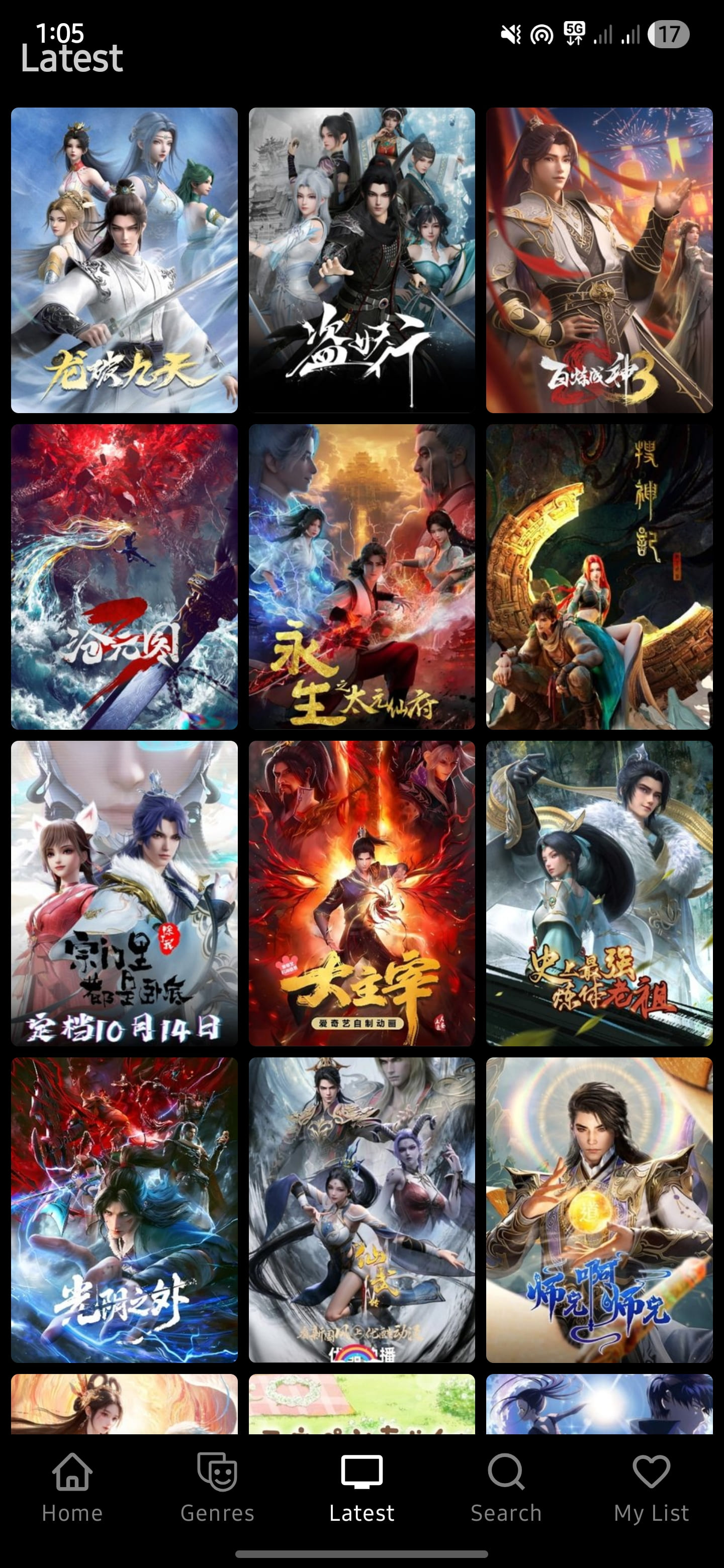
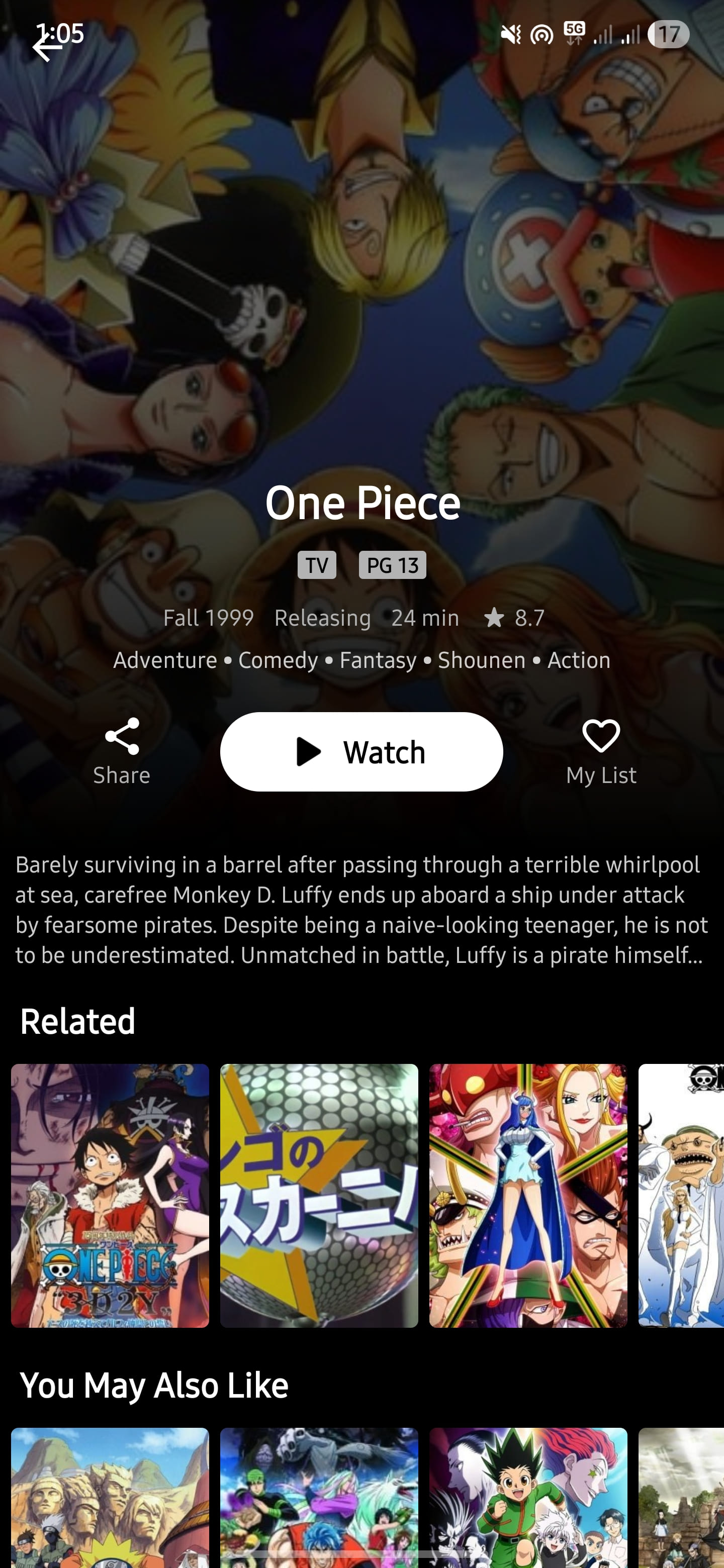
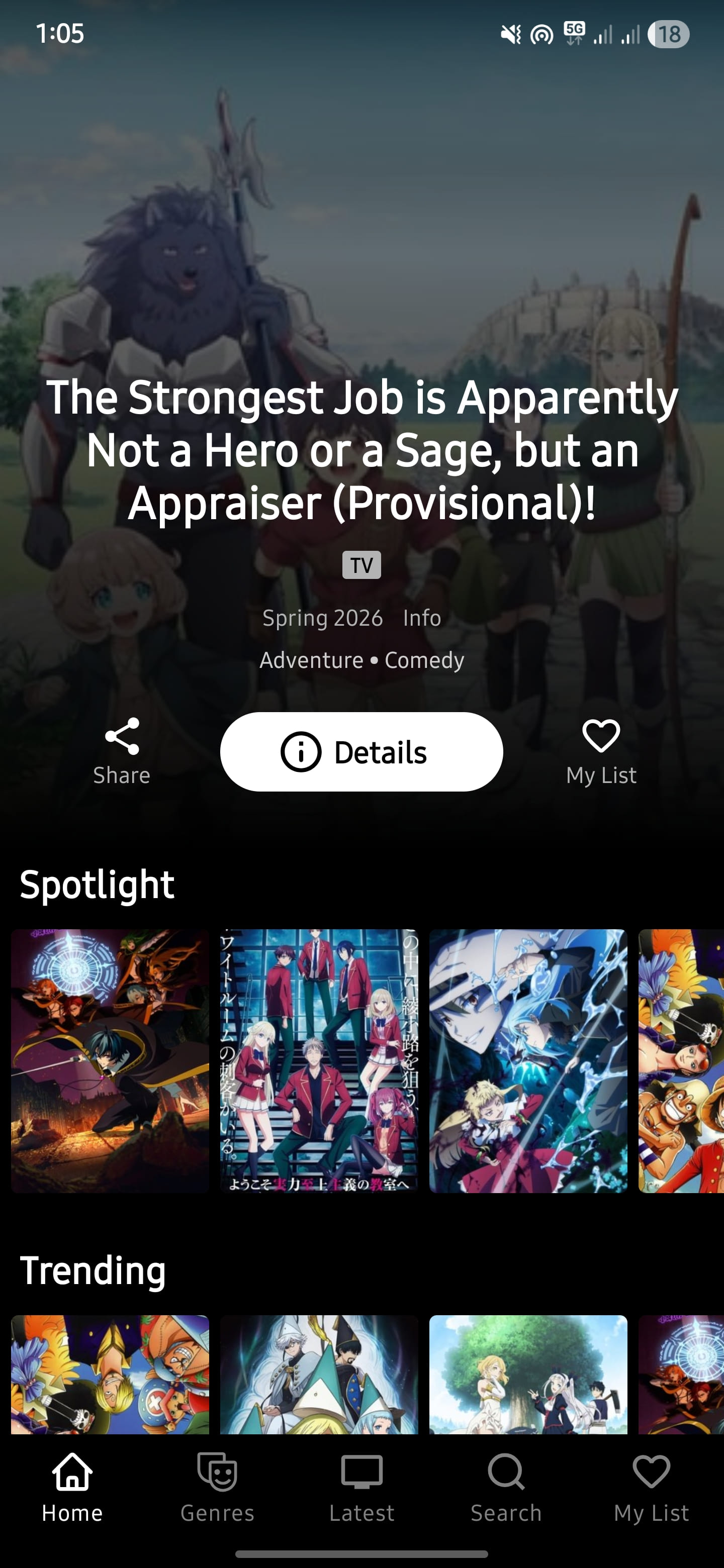
AniLab2 MOD APK: Complete Review, Features, Installation, Safety & Alternatives.
| Detail | Information |
|---|---|
| App Name | AniLab2 |
| Version reviewed | 1.0.5 |
| Package Name | com.xo.anilab |
| App Size | About 3.6–4 MB |
| Android Requirement | Android 7.0 or later |
| Architecture | ARM, ARM64, x86, x86_64 |
| Category | Anime / Entertainment |
| Developer | AniLab |
| Price | Free |
| Latest version checked | 1.0.5 |
| MOD claim | Ads removed / fewer interruptions |
| Root Required | No |
| Internet | Required for streaming |
| Login | Not required for basic use |
The version information above is based on a currently indexed AniLab2 1.0.5 APK listing. The listing reports Android 7.0+, a package name of com.xo.anilab, and a file size of roughly 3.96 MB.
What Is AniLab2?
AniLab2 is an Android anime-streaming application designed for users who want a lightweight way to browse and watch anime. Its current public website advertises HD playback, multiple languages, a search system, continued watching, genre browsing, and an ad-free experience.
One thing worth understanding before installing it is that AniLab2 is not the same thing as an official mainstream anime service such as Crunchyroll. Its APK distribution is primarily through websites rather than the Google Play Store, so users should pay more attention to where the APK comes from and whether the downloaded file matches the advertised version.
The current public information lists version 1.0.5, while community discussions from June and July 2026 show that users have experienced server, catalog, and availability issues at different times.
AniLab2 Features
1. Lightweight Application
AniLab2 is unusually small compared with many modern streaming applications. The currently listed 1.0.5 build is around 3.6–4 MB, which makes the initial installation relatively easy even on devices with limited storage.
2. HD Streaming
The official AniLab2 website advertises playback up to 1080p. Actual quality can depend on the available source, server performance, network connection, and the particular anime episode.
3. Search and Genre Browsing
The app is designed around finding anime quickly rather than navigating a complicated interface. Its advertised features include smart search and genre filtering.
4. Continue Watching
AniLab2 advertises a continue-watching system that allows users to return to previously watched episodes instead of manually searching for the same title again.
5. Subtitles and Dubbed Content
The public feature information mentions support for subtitles and multiple language options. However, availability can vary between titles and sources, so it is better not to assume that every anime will have every dub or subtitle option.
6. No Account for Basic Use
The official site says users can start watching without creating an account, although it also mentions optional login functionality for syncing a watchlist across devices.
7. Ad-Reduced MOD Version
The 1.0.5 MOD listing specifically describes ads being removed and fewer interruptions during browsing and playback.
Keep in mind that different websites can distribute modified APKs under the same name. Therefore, “MOD” should not automatically be treated as a guarantee that every copy is identical.
AniLab2 Requirements
The current 1.0.5 listing reports:
- Android 7.0 or newer
- Approximately 4 MB of storage for the APK
- Working internet connection
- No root access required
- Compatible builds for ARM, ARM64 and x86 architectures
For HD streaming, however, storage is not the only consideration. Your internet connection and the streaming source have a much larger effect on playback quality.
How to Install AniLab2 MOD APK
If you decide to install an APK outside Google Play, follow these steps carefully:
- Download the APK from a source you trust.
- Check the file name, version and approximate size before opening it.
- Scan the APK with your device’s security software.
- Open the downloaded APK.
- If Android blocks the installation, enable installation permission for the browser or file manager you used.
- Return to the APK and select Install.
- Open AniLab2 after installation.
- Test search and playback before relying on the app as your primary anime player.
- Disable the browser’s unknown-app installation permission again when finished.
If another AniLab2 build is already installed, you may need to uninstall it before installing a differently signed MOD package. The currently indexed 1.0.5 listing specifically recommends removing the original build first to avoid installation conflicts.
Common AniLab2 Problems
Anime Not Loading
This is one of the biggest concerns with third-party streaming applications. Community reports from July 2026 mention episodes failing to load and an “Error 2004 source not found” message.
Try:
- Restarting the app
- Switching between Wi-Fi and mobile data
- Trying another episode
- Waiting and checking again later
- Using another streaming application if the source remains unavailable
Black Screen
Some users have reported black playback screens when attempting to watch anime. In community discussions, these issues were sometimes associated with server or regional problems rather than the user’s phone.
Missing Anime or Episodes
AniLab2’s catalog may not always contain every title or the newest episode immediately. A July 2026 discussion specifically mentioned missing older anime and delayed updates.
Buffering
Buffering does not necessarily mean the application itself is bad. Streaming depends on the source server, geographic location, network congestion and video quality.
If 1080p constantly buffers, try a lower resolution first.
Installation Conflict
If Android reports that the application cannot be installed because another version is already present, uninstall the previous AniLab2 build and install the new version again. Make sure you have backed up anything important before removing an application.
Is AniLab2 MOD APK Safe?
This is the section where users should be particularly careful.
A third-party APK cannot automatically be considered safe simply because it is called “AniLab2 MOD APK.” Modified APKs are not distributed through the same verification process as applications installed from Google Play.
There is some positive evidence for the specific AniLab2 1.0.5 file currently indexed by independent scanning services. One scan reported 0 detections from 75 antivirus engines for the analyzed APK and described the observed risk as low. However, the same report also states that runtime coverage was incomplete, meaning a clean scan should not be interpreted as an absolute guarantee of safety.
The safest approach is therefore:
- Download only from a source you independently trust.
- Verify that the version matches the one you intended to install.
- Scan the APK before installation.
- Avoid APKs that request unrelated or excessive permissions.
- Do not enter sensitive passwords into unofficial applications.
- Keep Google Play Protect enabled.
- Delete the APK after installation if you do not need it anymore.
Also remember that the safety assessment applies to the specific scanned file, not every AniLab2 APK available online.
Real-World User Experience
Community feedback about AniLab2 is mixed, which is more useful than simply giving the app a perfect rating.
Some users have praised AniLab2 for its interface and relatively smooth experience compared with other anime applications. One July discussion described it as preferable to alternatives that repeatedly buffered, while another user said AniLab2 worked well on older devices.
At the same time, users have reported problems including delayed episode updates, missing titles, black screens and source errors. A July discussion also mentioned that some users had difficulty finding particular episodes.
There have also been reports of users moving away from AniLab2 when availability became unreliable. By late July, community discussions were already recommending alternatives such as Zangetsu, Animo and other anime applications.
Overall: AniLab2 can be attractive if you want a small, simple anime app, but server and catalog reliability are the biggest weaknesses reported by users.
AniLab2 MOD APK Pros and Cons
Pros
- Very small APK size
- Android 7.0+ support
- Simple interface
- Search and genre browsing
- HD playback advertised
- Continue-watching functionality
- Multiple subtitle/dub options advertised
- No root requirement
- MOD 1.0.5 listing reports fewer ads
Cons
- Not distributed through Google Play
- Third-party APK security needs to be considered
- Streaming sources can stop working
- Some users report missing episodes
- Catalog updates may be delayed
- Server problems can cause black screens or playback errors
- Different websites may distribute different modified APKs
AniLab2 Alternatives
If AniLab2 is unavailable or a particular episode does not work, there are safer mainstream alternatives.
Crunchyroll
Crunchyroll is one of the most established anime streaming platforms, with a large official catalog, simulcasts and support for multiple devices. Its current plans include ad-free viewing and offline downloads on eligible plans.
Tubi
Tubi provides free, legal streaming supported by advertising. Its anime section currently includes titles such as Naruto, Hunter × Hunter, JoJo’s Bizarre Adventure and Pokémon, although availability varies by region.
Anime-Planet
Anime-Planet offers a selection of legally available anime through industry-supported partnerships. It is also useful for discovering and organizing anime you want to watch.
Final Verdict
AniLab2 is an interesting option for Android users looking for a lightweight anime streaming application. Its small installation size, straightforward interface, search features and advertised HD playback make it appealing.
The biggest issue is reliability rather than the basic interface. Real users have reported missing episodes, delayed updates, source errors and occasional server problems.
The MOD version also deserves extra caution because modified APKs can come from many different sources. A specific 1.0.5 file has received a clean antivirus scan, but that does not make every AniLab2 MOD APK safe.
Our overall take: AniLab2 is worth considering as a lightweight anime app, but users should keep an alternative available and verify any APK before installing it.
For official and legally licensed viewing, Crunchyroll, Tubi and Anime-Planet are better choices when the required anime is available in your region.
Official AniLab2 information: AniLab2 website
Note: Anime availability, streaming servers, APK versions and regional access can change without notice.
Download APKAniLab2 MOD APK FAQ
Is AniLab2 MOD APK free?
Yes. AniLab2 is advertised as a free anime streaming application, and the currently indexed MOD version is also listed as free. However, different APK distributors may modify the application differently.
Is AniLab2 available on the Google Play Store?
The current AniLab2 distribution information indicates that the APK is distributed directly rather than through Google Play. Be careful with websites claiming to provide an “official Play Store MOD APK.”
What Android version is required for AniLab2?
The currently listed AniLab2 1.0.5 build requires Android 7.0 or newer.
How big is AniLab2 APK?
The 1.0.5 build is approximately 3.6–4 MB, depending on the source and packaging of the APK.
Does AniLab2 require root?
No. The currently listed 1.0.5 version does not require root access.
Does AniLab2 have ads?
The AniLab2 website advertises an ad-free experience, while the 1.0.5 MOD listing specifically describes ads being removed. However, different builds can behave differently.
Is AniLab2 MOD APK safe?
Safety depends on the exact APK file and where it came from. A specific AniLab2 1.0.5 sample has been reported with 0 detections from 75 antivirus engines, but the scan also had incomplete runtime coverage. Therefore, users should scan the APK themselves and avoid treating any MOD APK as automatically safe.
Why is AniLab2 showing a black screen?
A black screen can result from a failed streaming source, server problem, regional availability issue or temporary service outage. Restart the app, change your connection and try another title before assuming your phone is the problem.
Why does AniLab2 show “Error 2004”?
Community reports have associated Error 2004 with a source-not-found problem. This generally indicates that the selected streaming source is unavailable rather than necessarily indicating a problem with your Android device.
Why are some anime episodes missing?
AniLab2 depends on its available catalog and streaming sources. Users have reported delayed updates and missing titles or episodes, so a newly released episode may not always appear immediately.
Can I watch anime in 1080p on AniLab2?
The AniLab2 website advertises HD playback up to 1080p. Actual resolution depends on the available source, title, server and your internet connection.
Does AniLab2 support subtitles?
Yes. The app’s published feature information advertises subtitle support and multiple language options. Availability can differ between anime titles.
Does AniLab2 support dubbed anime?
The published information indicates support for dubbed content, but the availability of a particular language or dub depends on the title and source.
Do I need an account to use AniLab2?
The official website says that basic viewing does not require an account. It also mentions optional login functionality for syncing a watchlist across devices.
Why won’t the AniLab2 APK install?
Common causes include having another AniLab2 version installed, insufficient storage, an incompatible Android version, a corrupted APK or an Android security restriction. If another build is installed, uninstalling it may resolve a package-signature conflict.
Can AniLab2 be used on Android TV?
Compatibility information for TV devices is inconsistent, and recent community discussions have reported difficulties using AniLab2 on TV. If TV support is important, check the current version’s compatibility before relying on it.
Is AniLab2 better than Crunchyroll?
They serve different purposes. AniLab2 is a lightweight third-party application, while Crunchyroll is an established official anime streaming service with licensed content, simulcasts and premium features. For reliability and official licensing, Crunchyroll is the stronger choice.
What can I use instead of AniLab2?
Crunchyroll, Tubi and Anime-Planet are alternatives worth considering. Tubi offers free, legal streaming supported by ads, while Anime-Planet provides a selection of legally available anime through industry-supported partnerships.
Does AniLab2 work without internet?
No. AniLab2 is primarily a streaming application, so an internet connection is required to load online anime sources and stream episodes.
Should I install an AniLab2 MOD APK?
That depends on your priorities. If you choose to use a third-party APK, verify the source, scan the exact file before installation and keep Android security features enabled. For the lowest security and reliability risk, use an official anime streaming service instead.
![Spotify Premium v9.1.58.1567 MOD APK [ Direct Download ] Latest Version for Android](https://apkxival.co.in/wp-content/themes/hueman/assets/front/img/thumb-medium-empty.png)